The Ontology: your enterprise, as one live model
Why an Ontology
Your ERP knows tables: BSID, AR_PAYMENT_SCHEDULES_ALL, a spreadsheet tab called “Overdue final v3”. Your people think in customers, invoices, plants and orders. The Ontology is the translation layer between the two, defined once and shared by every team.
When three companies in a group run three different ERPs, each maps into the same Ontology. An Invoice is an Invoice, whether it came from SAP, Oracle EBS or an upload, with its amount converted to the group currency and its origin recorded.
What the Ontology holds
| Object types | The nouns of your business: Company, Customer, Invoice, Sales order, Product, Plant |
|---|---|
| Properties | Typed fields, with markings, masking or encryption where sensitive |
| Links | How objects relate: an Invoice belongs to a Customer and a Company |
| Derived properties | Values computed from others, such as days overdue or a risk band |
| Interfaces | Shared shapes across types, such as a Party for customers and suppliers |
| Actions | The verbs: what may be done to an object, with rules, parameters and approvals |
| Time series and history | Measurements over time, and every version of every object |
Worked example: receivables in the Corporate Base Pack
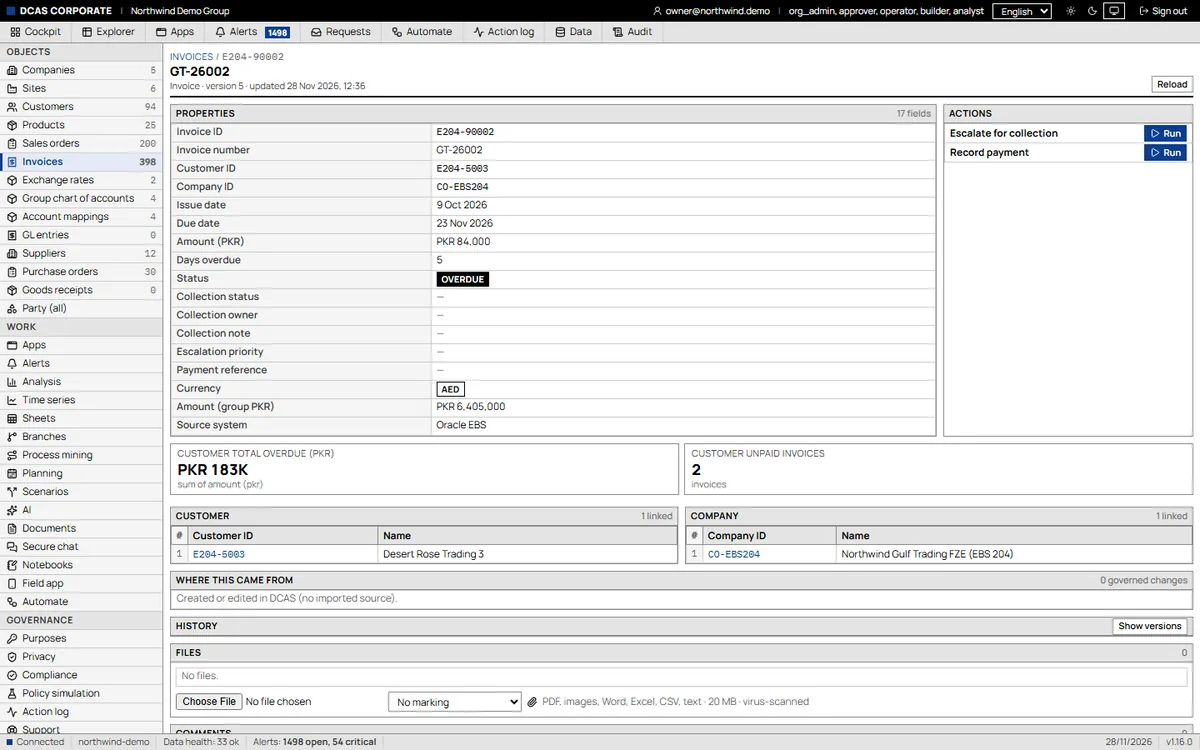
The Corporate Base Pack ships ten object types (Company, Site, Customer, Product, Sales order, Invoice, FX rate, GL account, Account mapping, GL entry), six Actions, an interface, a production schedule and four applications. This is how one of them, the Invoice, is defined.
| # | Property | Type | Notes |
|---|---|---|---|
| 1 | invoice_id | string | Primary key |
| 2 | invoice_number | string | Title shown to people |
| 3 | customer_id → Customer | link | One customer per invoice |
| 4 | company_id → Company | link | The group company that issued it |
| 5 | due_date | date | From the source ERP |
| 6 | amount, currency | money | In the invoice currency |
| 7 | amount_group | money | Converted to group PKR at the mapped rate |
| 8 | days_overdue | derived | Days past due date; zero once paid. Refreshed daily |
| 9 | status, collection_status | enum | Open, overdue, paid; collection workflow state |
| 10 | payment_reference | string | Marked finance; masked to the last four characters |
| 11 | source_system | string | SAP, Oracle EBS, upload: lineage to the origin |
Action: Escalate for collection
| Allowed when | Status is overdue, and the invoice is not already in collection |
|---|---|
| Parameters | Collection owner (required), priority (medium or high), note (required) |
| Effect | Sets collection status, owner, priority and note on the invoice |
| Who | People with the operator role; everyone else sees why the Action is disabled |
| Record | Before and after values, who and when, in the hash-chained audit trail |
The other five Actions
| Record payment | Closes an invoice with a payment reference |
|---|---|
| Change credit limit | Finance only; can require approval |
| Register customer | Creates a new customer object |
| Update order status | Moves a sales order through its life cycle |
| Plan production | Sets planned start and end on an order |
How the Ontology is built and changed
- 01Start from a pack
Install a signed industry pack. It brings object types, Actions, rules and applications that already work.
- 02Map your sources
Map each source table and code list onto the pack’s object types, and reconcile the totals.
- 03Extend
Add properties, links and Actions for your business in a new pack version. Try changes to data on a branch before merging them.
- 04Version
Every pack is versioned and signed; production refuses unsigned packs.
- 05Reuse
The next use case builds on the same objects. The second Data Sprint starts where the first one ended.
One model, every surface
- Applications read objects and offer their Actions, within each person’s permissions.
- Rules and alerts watch object properties and fire on thresholds, windows and patterns.
- Process mining reads object history as an event log.
- Planning schedules objects against resources and writes the plan back through an Action.
- AI reads only the properties it is cleared for, and proposes Actions that people approve.
- BI tools and the SDK see the same objects, with the same markings.
Security is part of the model
Markings live on object types and properties. A person without the finance marking does not see the credit limit in an application, cannot filter or sort by it, cannot export it, and an AI acting for them never receives it. The rule is defined once, in the Ontology, and enforced everywhere.
Actions carry their own criteria: who may run them, in which state, with which parameters, and whether a second person must approve. That turns policy into something the system enforces, not a document people are asked to follow.